Objectives & prerequisites
- Learn about Drupal's routing system
Routes connect paths to callback methods
When you request a path such as /hello/sarah, Drupal needs to know what to do:
- Show content?
- Show the result of a database query?
- Send an email?
- Verify your username and password, and log you in?
- Start a data export?
- Do something else?
This is where routes come in.
A route tells a web application, such as Drupal, what to do when a certain path is requested. To be more specific, a route specifies which code needs to be executed when a certain path is requested.
Let's look at a basic example for an imaginary route, provided by the imaginary 'Demo' module:
Route breakdown
Let's have a quick look at the components of that route:
The route's identifier.
Usually consists of:
- the name of the module (on the left hand side of the dot)
- something that identifies the page or action (right hand side of the dot)
The path of the action or page you're building.
The full identifier of the function that should be called when the given path is requested.
This is also called the route's callback, or callback function, or callback method.
All these different names refer to the same thing: the code that must be executed.
Don't worry about the format right now; we'll cover this in detail later.
The title of the page you're creating.
The name of the permission the user needs to have to be able to access this route.
If your imaginary Demo module were enabled, a request for /my-cool-page would result in this:
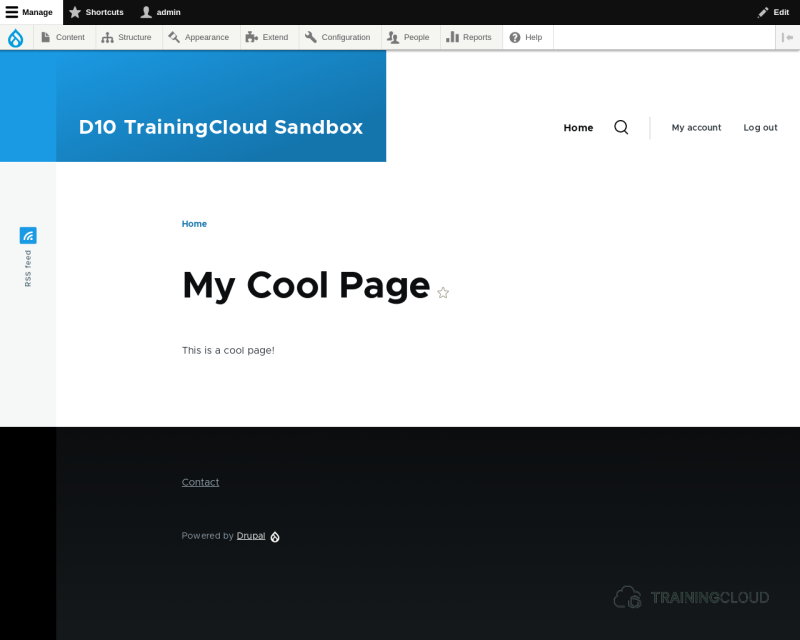
So, a route connects a path to a callback method. When Drupal receives a request, it will scan its list of predefined routes to figure out which callback method to call.
→ If the route is found, the corresponding code is executed.
→ If the route is not found, Drupal shows ERROR 404 (page not found).
A route's callback method will most commonly do one of the following:
- Execute a task (delete a user, trigger a download, ...).
- Assemble data that should be shown on a page.
Examples of routes
- /node/1 --> shows a page with the content of node with ID = 1.
- /user/login --> shows a page with the login form
- user/logout --> ends the session and redirects the user to the front page
- /articles --> could show a list view of articles
- /admin/members/export/csv --> could show a list of users in an Excel-compatible format
Why use routes instead of nodes?
"Why would you create a route and a callback and all that to create a page, if you can just create a node of the type Basic Page and set its path to whatever you want?"
This is a common question.
Drupal's route system is what connects paths such as /node/1 and /articles/2022-01-17/hello-world and /admin/content possible in the first place. Drupal would not function without it.
If you want to create content in Drupal and use all the features that make Drupal great (edits, revisions, translations, insert reusable media, and so on), you should absolutely just create nodes. It makes little sense to create a module with a route and callback, just to show a simple page with a bit of content.
Routes are used for specific scenarios:
- You want a page to be available just by turning on a module.
- You want to dynamically build the content, using code to get data from the database or from an external source, or do something else that Drupal doesn't let you do by default.
- You want to show a coded form (a form built entirely in code) at a certain path, and then execute custom logic when that form is submitted.
- You want to set up a more advanced system with route patterns, similar to how
/node/1shows a page whose content is made from the node with ID 1,/node/2shows the page for node with ID 2, and so on.
Later in this course you will create such a dynamic route: /hello/bob will show "Hello, bob!", /hello/zhou will show Hello, zhou!, and so on. This is something you can only do by creating your own module with your own custom route.
Summary
- Routes are a common web development design pattern that connect paths to callbacks.
- A route connects a path to code that Drupal must execute.
- You define routes in your module's _routing_file, named MY_MODULE.routing.yml
- A route is necessary if you want to create a page, in code, that is not a node or a view or anything else Drupal lets you build using the administration interface.
- A route most commonly shows a page, but can also just execute a task and then redirect to another page.