Option 1: Via the Admin UI
Assuming you've created at least a few pages, go ahead and generate your static site.
URL: /admin/config/tome/static/generate:
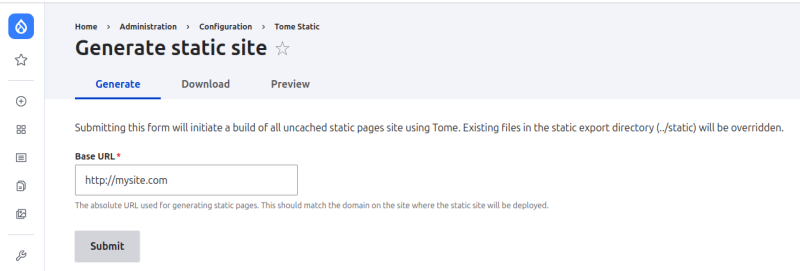
Your static site will now be generated.
See below for details on where to find the generated site.
Option 2: Via the command-line
drush tome:static --uri=https://mysite.comYour static site will now be generated:
Generating static HTML...
 180/180 [▓▓▓▓▓▓▓▓▓▓▓▓▓▓▓▓▓▓▓▓▓▓▓▓▓▓▓▓] 100%

Processing related assets and paths...
 30/30 [▓▓▓▓▓▓▓▓▓▓▓▓▓▓▓▓▓▓▓▓▓▓▓▓▓▓▓▓] 100%

Processing related assets and paths...
 5/5 [▓▓▓▓▓▓▓▓▓▓▓▓▓▓▓▓▓▓▓▓▓▓▓▓▓▓▓▓] 100%

[OK] Exported static HTML and related assets.
That's it. Your static site is generated.
Changing the export location
By default Tome will export the static site to ../html/, relative to the DRUPAL_ROOT directory:
My Site
├── config
├── html   <-------- Default Tome export directory
├── vendor
├── web    <-------- Drupal root directory
├── README.md
├── composer.json
├── composer.lock
...
You can override the export directory in your settings.php (or local settings include file) if you want to use a different directory name or location.
Rather than /html/ we prefer to name our export directory /static/ to avoid confusion with other directories named html (such as /var/www/html):
# File: settings.php or a local settings file you're including.

# Override default export directory.
$settings['tome_static_directory'] = '../static';
Next steps
Now it's time to review what Tome actually generated:
- Does it all look ok?
- Is everything there?
- Are we sure we haven't exported paths we didn't mean to export?