Objectives & prerequisites
- Learn about Drupal's reference documentation.
- Learn how to use the docs to discover available services.
- Learn how to use the docs to learn more about what each service offers and how to use it.
Where can I find the docs on services?
The current_user service is a core service - it's provided by Drupal core (as opposed to being provided by a contributed module).
You can find a lot of information about how Drupal works internally on drupal.org's API reference site https://api.drupal.org:
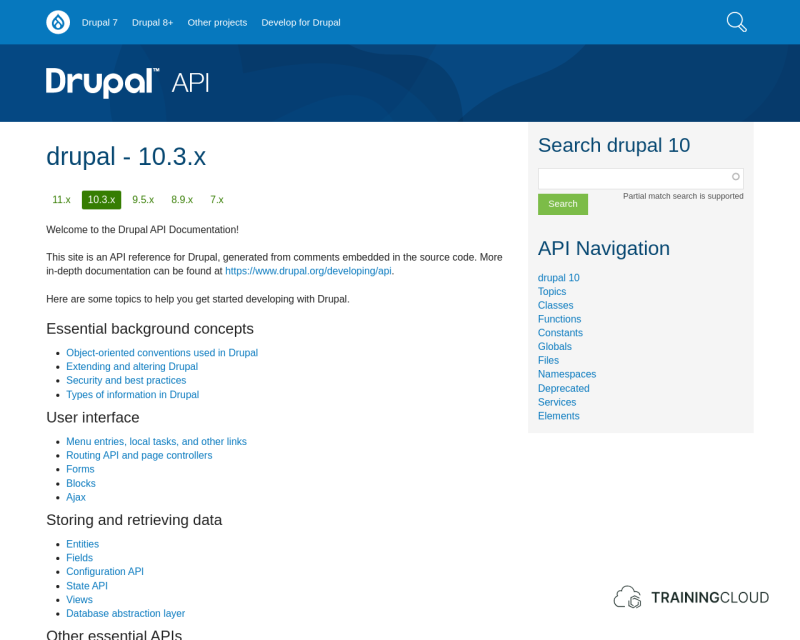
→ Open up https://api.drupal.org in a new tab or window and follow along as we take a quick tour.
Note:
Drupal's reference documentation is not always suitable for absolute beginners. The information you find there can be cryptic and overwhelming. Don't give up! Keep browsing and exploring!
Selecting the right Drupal version
At the top of the page you can choose for which version you want to consult the documentation. This course is based on the latest version of Drupal 10, which is 10.3.
Main navigation and reference search
On the right hand side you find a concise navigation menu and a handy search box where you enter (partial) names of classes, functions, etc, or just search by keyword.
Browse by topic
On the left hand side you find a list of topics to help you find your way in the docs.
Learning more about the current_user service
What follows is a step by step description of the journey a typical Drupal developer will take when using the reference documentation to figure out how specific parts of Drupal work internally.
In our case, we're going to try to find the list of services Drupal offers, find the current_user service, and drill down into its details to learn how it works and which classes, methods, and properties could be useful for our purposes.
This process is remarkably similar to a treasure hunt, even for experienced developers. You can find a lot of great information in the Drupal docs, but it's not always an easy journey.

1. Find the section on services
In the list of topics on the left hand side find and follow the link to Services and the Dependency Injection Container.
2. Find the list of all available services
Refer to core.services.yml for the full list of core services.
3. Find the current_user service
→ Find the current_user service in the table of services and click on its class name Drupal\Core\Session\AccountProxy.
4. Inspect the service's class details
If you're lost at this point, here's the link to the class definition for \Drupal\Core\Session\AccountProxy.
Pay no attention to the stuff about 'Proxy" or the class hierarchy - those concepts aren't useful to you right now.
If you click on the difficult to find "View source" link, between the "Namespace" and "Members" title, you can see the full source code of the class, including all of its properties and methods you can use, such as the getDisplayName() method you used in the previous task.
At the bottom of the page you find the same list of properties and methods, but nicely formatted in a table.
→ in that table, find and follow the AccountProxy::getDisplayName() link. It leads you to a page with information about the method, which parameters it accepts (if any) and what it returns (if anything).
In this case:
- The method doesn't accept (or rather, doesn't need) any parameters.
- The method returns a string (text) that represents the display name of the account
→ go back to the previous page and have a look at the other properties and methods that are available for the AccountProxy class.
Some of the other methods available in the AccountProxy class include:
id()getTimeZone()getRoles()
By looking over this list of methods you get a better idea of other information you can retrieve or functionality you can access related to the AccountProxy class.
Activity
- Go over the list of methods and properties available in the
AccountProxyclass. Compare the documentation and details for the following similar-looking methods:getAccountName()getDisplayName()
Can you articulate the difference between the two methods and good scenarios for their use?
getDisplayName(): https://api.drupal.org/api/drupal/core%21lib%21Drupal%21Core%21Session%21AccountInterface.php/function/AccountInterface%3A%3AgetDisplayName/10
getAccountName(): https://api.drupal.org/api/drupal/core%21lib%21Drupal%21Core%21Session%21AccountInterface.php/function/AccountInterface%3A%3AgetAccountName/10
Activity
- Go over the list of methods and properties available in the
AccountProxyclass.- Which method would you use to retrieve the current user's email address?
Activity
- To your my_services_demo module, add a feature to display a user's email address when you browse to
/current_user_email- Keep your existing route and controller in place.
- Add a new route to your routing file and a new method to your controller.
- Give the route and controller method a useful name of your choice.
- Your new route and controller method will be very similar - almost identical - to your existing route and method.
- Be sure to clear your caches after changing your code files.
Summary
- You can find reference documentation with the full annotated source code on https://api.drupal.org.
- You've used the documentation to look up a service and a class definition, and discovered other methods and properties you can use.
- You've added a new route with matching controller, and used a method you hadn't used before to display the current user's email address.