Objectives & prerequisites
- Research the logger service and the class that provides it.
- Add a new route and controller and use the logger service.
The Logger Service
Every system or application needs a good logging mechanism to keep track of intentional and unintentional system-related events. Logs are often a crucial tool to help you figure out what went wrong, who performed a certain action, which user attempted an unsuccessful login, and so on.
You could use the messenger service to display messages to users, but once a message has been displayed, it's gone. There's no default mechanism in Drupal that keeps track of which messages have been displayed or to whom they were displayed.
As site builders we want to be able to create event-related messages that are permanently stored so we can retrieve them later, if we're troubleshooting or tracing a certain set of events.
Drupal's logger service does just that. Similarly to the messenger service, the logger service lets you generate and permanently store log entries.
Administrative users can access the log via Manage > Reports > Recent Log Messages:
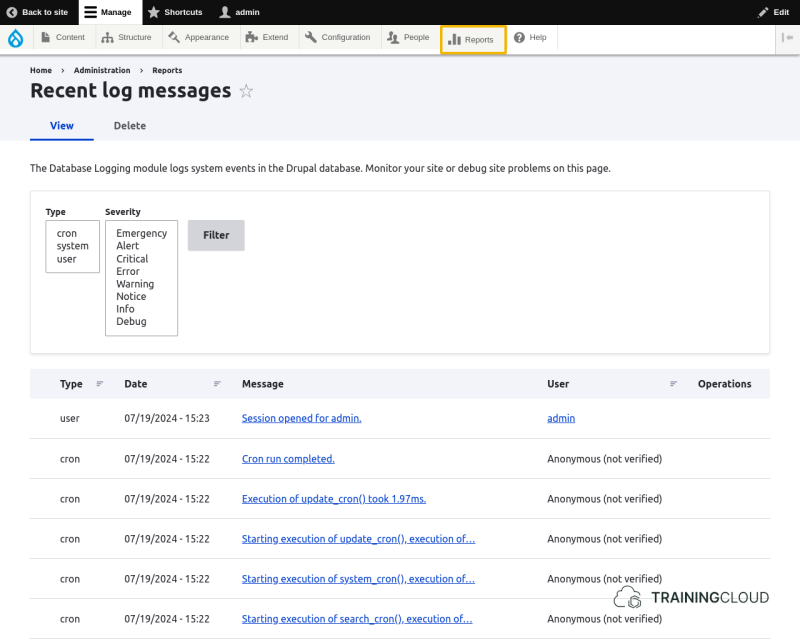
You can filter by type (also called channel) and severity (also called log level), and you can click on any message to drill down and see all details including date/time, user, IP address, on which page the error occurred, and more.
Drupal's user-facing administration interface uses the terms "type" and "severity", whereas the underlying service and classes more often refer to "channel" and "log level".
Ultimately they mean the same thing, but to avoid confusion it's a good idea to use "type" and "severity" when you're talking to users, and use "channel" and "log level" when talking to fellow coders.
Severity / Log levels
Here's what the documentation tells us about the various log levels:
System is unusable.
Action must be taken immediately.
Detailed debug information.
Runtime errors that do not require immediate action but should typically be logged and monitored.
Exceptional occurrences that are not errors.
Normal but significant events.
Interesting events.
Detailed debug information.
Message Types / Log Channels
Each message has an associated type or channel to let users view only messages of a certain type/channel.
By convention, in Drupal 10, the type/channel of a log entry is set to the module or core subsystem (group of modules) that generated it. You will almost always use the name of your module as the type/channel, unless you're working on a core subsystem.
Using the Logger Service
The syntax differs slightly depending on whether you call the logger via the service container or via your object.
Via the service container
$logger = \Drupal::logger('My Module');
$logger->notice('Something happened!');
Or if you want to do it all in one line:
\Drupal::logger('My Module')->notice('Something happened!');Via your object
$logger = $this->getLogger('My Module');
$logger->notice('Something happened!');
Activity
- You are now aware of the different log levels the logger service uses.
- Use the reference documentation to research which methods you can use to generate log messages for each log level.
- Searching for 'logger' leads you to the
vendor/symfony/http-kernel/Log/Logger.phpclass, which is the one that provides the logging service.
Activity
- Add a new route and controller to my_services_demo, similar to the
AlertControlleryou added in a previous unit.- Set the route's path to
/logging - The page should render something like "Log entries have been generated."
- The page controller should generate a log message for each log level, ensuring that the log channel is set to the name of your module each time.
- Set the route's path to
When you navigate to /logging, you should see "Log entries have been generated".
When you navigate to Manage > Reports > Recent Log Messages you should see all your log messages near the top of the list.
Activity
- Navigate to Manage > Reports > Recent Log Messages
- The name of your module should now appear in the list of types on the Recent Log Message page's filter form.
- Select it and filter so you only see the log messages your module generated.
Activity
Now that you have worked with the messenger and logger services, compare and contrast them:
- What is each service's main purpose?
- What is each service's intended audience?
- Which service is most useful for immediate event communication to users?
- Which service is most useful for historic insight into events?
Summary
- The logger service is similar to the messenger service.
- A log message's type/channel indicates which module or subsystem generated it.
- A log message's severity/log level indicates its level of importance.
- A historic overview of log messages is available at Manage > Reports > Recent Log Messages.