Form Elements

Objectives
  • Learn about different elements you can add to a form.
  • Learn where to find more information about all the element types and their properties.

Drupal offers a wide range of elements you can add to a form. In addition to the elements in core, you can create your own elements (they're plugins, just like blocks), or download contrib modules that define form elements.

Available element types

The list of available element types is part of the reference documentation.

→ open up the page on Form and render elements and filter on 'FormElement' to get the full list.

The list of element types includes:

  • Checkbox
  • Radio
  • Date
  • Email
  • URL (link)
  • Textfield
  • Textarea
  • Select
  • File
  • ...

Example

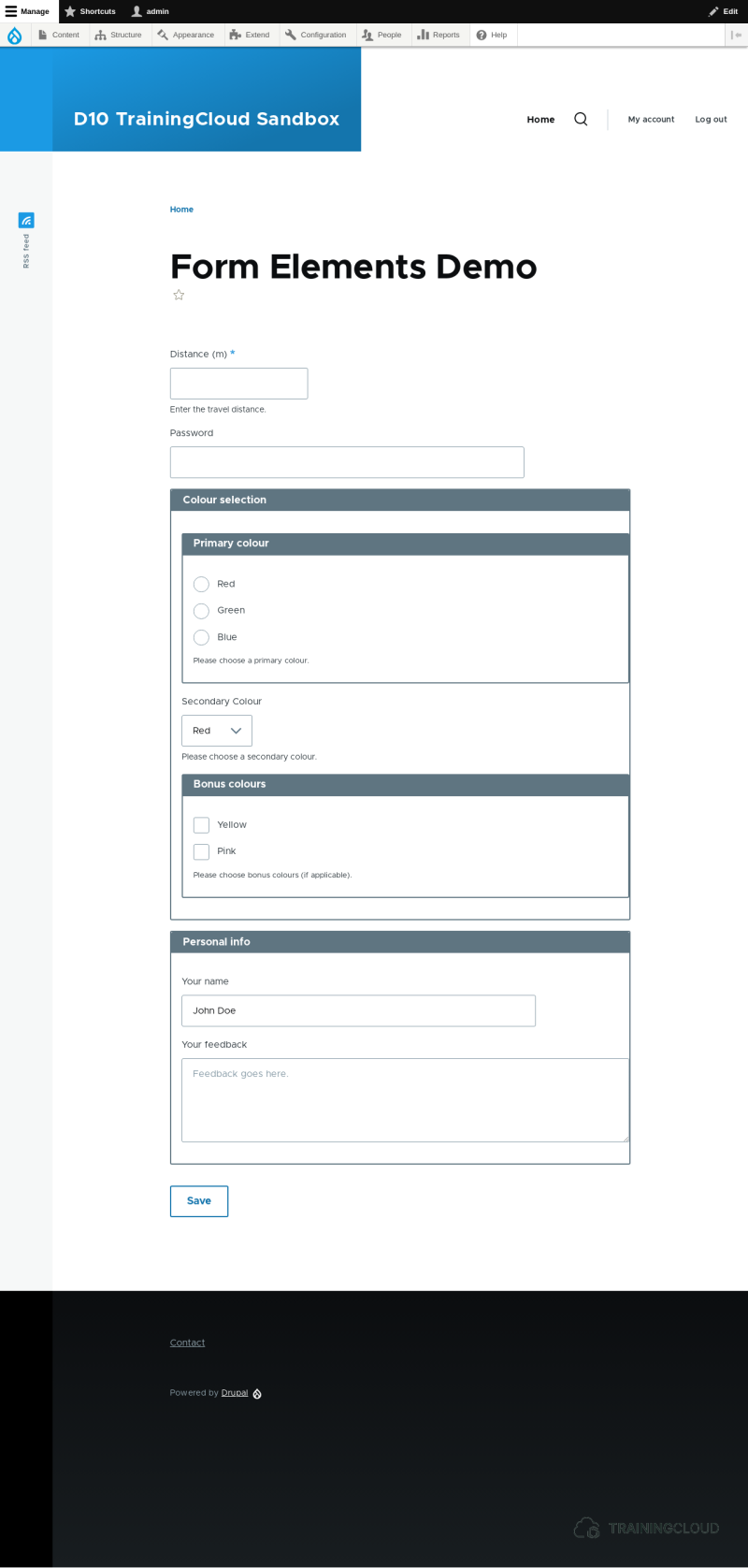
Here's the code that produces this form.
You'll notice a pattern in how each field is added to the form.

Code
<?php

namespace Drupal\my_form_demo\Form;

use Drupal\Core\Form\FormBase;
use Drupal\Core\Form\FormStateInterface;

/**
 * Class DemoForm.
 *
 * @package Drupal\my_form_demo\Form
 */
class DemoElementForm extends FormBase {

  /**
   * Returns a unique string identifying the form.
   *
   * @return string
   *   The unique string identifying the form.
   */
  public function getFormId() {
    return 'demo_element_form';
  }

  /**
   * Form constructor.
   *
   * @param array $form
   *   An associative array containing the structure of the form.
   * @param \Drupal\Core\Form\FormStateInterface $form_state
   *   The current state of the form.
   *
   * @return array
   *   The form structure.
   */
  public function buildForm(array $form, FormStateInterface $form_state) {

    // Add number field.
    $form['distance'] = [
      '#type' => 'number',
      '#title' => $this->t('Distance (m)'),
      '#description' => $this->t('Enter the travel distance.'),
      '#required' => TRUE,
    ];

    // Add password field.
    $form['password'] = [
      '#type' => 'password',
      '#title' => $this->t('Password'),
    ];

    // Next we're going to define two fields that each have the same set of options.
  
    // Define some options for the next two elements.
    $options = [
      'red' => $this->t('Red'), 
      'green' => $this->t('Green'),
      'blue' => $this->t('Blue'), 
    ];

    // Add a fieldset that will contain the next three fields.
    $form['colours'] = [
      '#type' => 'fieldset',
      '#title' => $this->t('Colour selection'),
    ];

    // Add radiobutton list.
    $form['colours']['primary_colour'] = [
      '#type' => 'radios',
      '#title' => $this->t('Primary colour'),
      '#options' => $options,
      '#description' => $this->t('Please choose a primary colour.'),
    ];

    // Add select list.
    $form['colours']['secondary_colour'] = [
      '#type' => 'select',
      '#title' => $this->t('Secondary Colour'),
      '#options' => $options,
      '#description' => $this->t('Please choose a secondary colour.'),
    ];

    // Add select list.
    $form['colours']['bonus_colours'] = [
      '#type' => 'checkboxes',
      '#title' => $this->t('Bonus colours'),
      '#options' => [
        'yellow' => $this->t('Yellow'),
        'pink' => $this->t('Pink'),
      ],
      '#description' => $this->t('Please choose bonus colours (if applicable).'),
    ];


    // Add another fieldset fieldset.
    $form['personal_info'] = [
      '#type' => 'fieldset',
      '#title' => $this->t('Personal info'),
    ];

    // Add two fields to the fieldset.
    
    $form['personal_info']['name'] = [
      '#type' => 'textfield',
      '#title' => $this->t('Your name'),
      '#default_value' => 'John Doe',
    ];

    $form['personal_info']['feedback'] = [
      '#type' => 'textarea',
      '#title' => $this->t('Your feedback'),
      '#placeholder' => $this->t('Feedback goes here.'),
    ];    

    // Add submit button.
    $form['save'] = [
      '#type' => 'submit',
      '#value' => $this->t('Save'),
    ];

    return $form;
  }


  /**
   * Form submission handler.
   *
   * @param array $form
   *   An associative array containing the structure of the form.
   * @param \Drupal\Core\Form\FormStateInterface $form_state
   *   The current state of the form.
   */
  public function submitForm(array &$form, FormStateInterface $form_state) {
    // Do something useful here.
  }

}

Breakdown

First we add two fields:

Code
<?php
 // Add number field.
    $form['distance'] = [
      // [...]
    ];

    // Add password field.
    $form['password'] = [
      // [...]
    ];

Then we add fieldset named 'colours' that will group the next three fields:

Code
<?php
$form['colours'] = [
     '#type' => 'fieldset',
     '#title' => $this->t('Colour selection'),
   ];

Then we add three fields to that fieldset. Notice the structure of the array of each of three fields:

Code
<?php
$form['colours']['primary_colour'] = [
  // [...]
];
 
$form['colours']['secondary_colour'] = [
  // [...]
];

$form['colours']['bonus_colours'] = [
  // [...]
];

The first array key of these three fields is 'colours', which is the array key of the fieldset:

  • First add a fieldset
  • Then add fields to that fieldset using the fieldset's array key as the fields' first array key.

Then we add another fieldset and add two fields to that fieldset.

We finalise with a submit button.

Activity

Throughout these examples we've demonstrated some properties:

  • Identify which fields are mandatory, and how that was defined.
  • Identify which field has a default value and which has a placeholder value. Default values and placeholder values are similar but not identical. What's the difference?
  • Compare the primary_colour and secondary_colour fields. Their definition is almost identical; only the #type property is different
    • Change the only the type field, and see what happens. Field types with option lists include select, radiobuttons, and checkboxes.
Hide hints
show hints

Activity

Build a Christmas dinner subscription form that asks for:

  • First name, last name
  • Number of guests (select list, choices range from 1 - 10)
  • Number of meat/fish choices (number field)
  • Number of vegetarian choices (number field)
  • Number of vegan choices (number field)
  • Whether your table would like to be alcohol-free or not.
Hide hints
show hints

Summary