Objectives & prerequisites
- Describe some of the features VSCode extensions can bring.
- List some recommended and often-used extensions PHP/Drupal development.
- Basic VSCode operations
- Installing VSCode extensions
- Basic command-line operations
Overview
VSCode is a great code editor, and with a few configuration tweaks you can make it even better for PHP / Drupal development.
In this unit you'll learn about and install a handful of VSCode extensions. Some of these require additional configuration and an explanation of how to use them while you're actually writing code.
These topics are addressed later in the materials on PHP, Object Orientation, and Drupal module development.
Must-have extensions
- Drupal (ID: stanislav.vscode-drupal)
- intelephense (ID: bmewburn.vscode-intelephense-client)
Useful extensions
- Twig Language 2 (ID: mblode.twig-language-2)
- PHP Debug (ID: xdebug.php-debug)
Extension identifiers
The VSCode Marketplace can contain multiple VSCode extensions with the same name, which can be confusing. To find the extensions you're looking for, always check the extension ID, which is always unique.
There are several ways to find an extension's ID:
In their Marketplace link
Example
https://marketplace.visualstudio.com/items?itemName=xdebug.php-debug
On their Marketplace page.
In the More info section on every extension's page on the Marketplace:
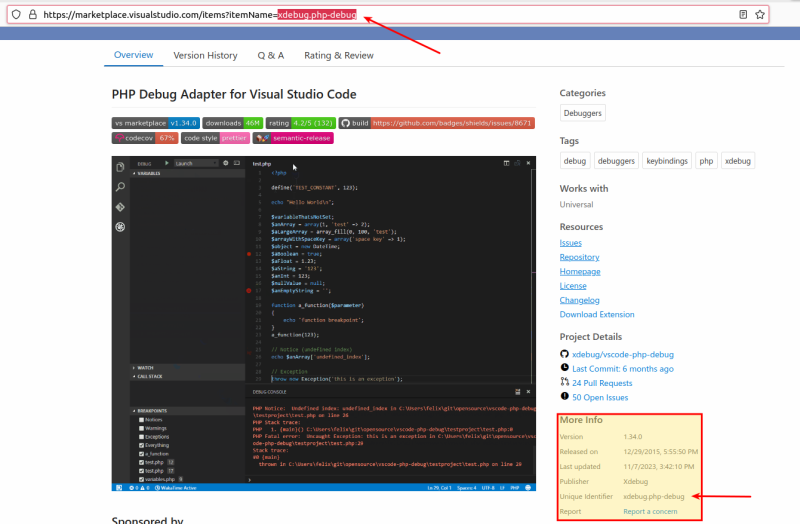
Inside VSCode
In the More info section on every extension's page inside VSCode:
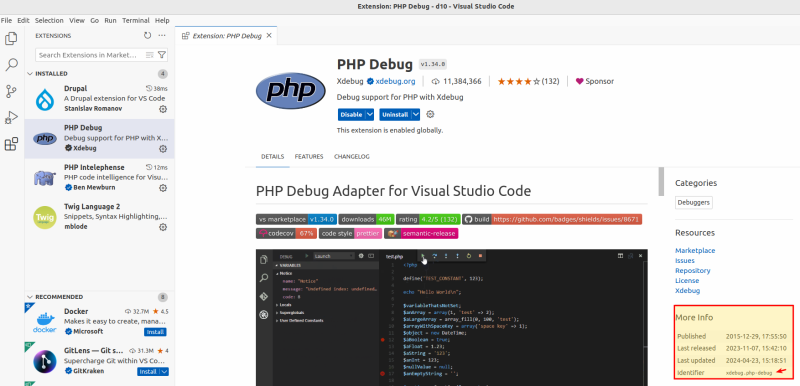
Activity
- Make sure you have a local Drupal site up and running.
- Navigate to the project's root directory and open VSCode with the command
code .to open that directory as a workspace.
Extension: Drupal
- Extension ID: stanislav.vscode-drupal
Link: https://marketplace.visualstudio.com/items?itemName=stanislav.vscode-drupal
This extension provides:
- Syntax highlighting
- Code completion
- Code & Documentation standards
Syntax highlighting
VSCode provides syntax highlighting for dozens of languages, and decides which language highlighting settings to use based on a file's extension.
This extension makes VSCode aware that certain Drupal-specific file types like .theme and .module should also be highlighted like regular PHP files.
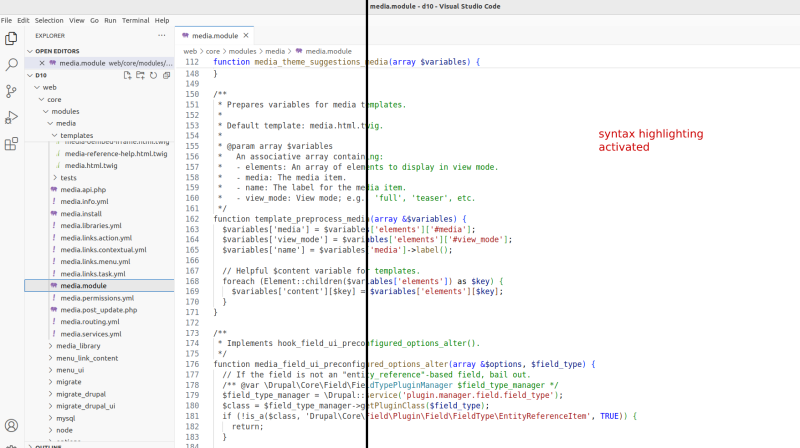
Code completion
Basic code completion for Drupal hooks, services, twig, and global variables.
Start typing the name of a Drupal hook, for instance, and the editor will provide a list of available hooks:
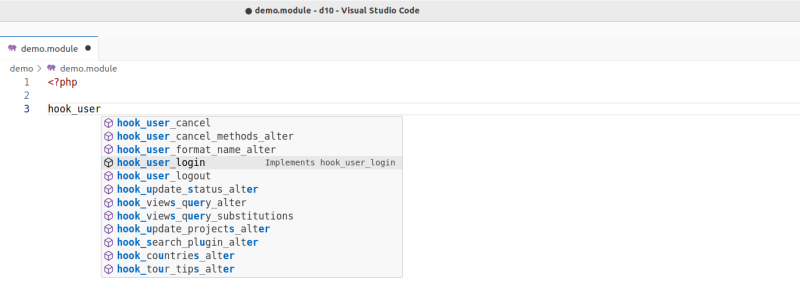
For syntax highlighting and basic code completion no additional configuration is needed.
Code & Documentation standards
This extension integrates the Coder and PHPCS tools used for automated checking of code and documentation standards.
→ Refer to the materials on development tools and good development practices to learn how to set up and use Coder and PHPCS.
Activity
Without installing this extension, open any .module or .theme file.
The code is not highlighted.
Install the extension and look at the code again.
The code should now be highlighted.
Can you spot any other differences in the interface after installing this extension?
.moduleand.themefiles are now shown with a PHP icon in the file explorer.- An additional clickable "Drupal" item has appeared in VSCode's status bar.
Extension Intelephense
- Extension ID: bmewburn.vscode-intelephense-client
- Link: https://marketplace.visualstudio.com/items?itemName=bmewburn.vscode-intelephense-client
The intelephense extension brings fast PHP code completion to VSCode. It will automatically scan your code base and autocomplete things like class names and function names, and help you navigate your code base by finding other places where a certain function is used or where it is originally defined.
Certain things such as Drupal hooks and Drupal service names are not discoverable with this tool due to the way that code is constructed. Other extensions, such as the Drupal extension mentioned earlier, fill this gap.
No configuration is necessary to get started, other than enabling this extension.
→ intelephense features are discussed throughout the materials on PHP, Object Orientation, and Drupal module development.
Extension: PHP Debug / XDebug
- Extension ID: xdebug.php-debug
- Link: https://marketplace.visualstudio.com/items?itemName=xdebug.php-debug
This extensions provides a bridge between VSCode and Xdebug, the leading PHP debugging tool.
→ Refer to the materials on Debugging PHP with Xdebug to learn about debugging and how to configure this extension and Xdebug itself.
Extension: Twig Language 2
- Extension ID: mblode.twig-language-2
- Link: https://marketplace.visualstudio.com/items?itemName=mblode.twig-language-2
This extensions provides Twig language support: it adds code snippets and syntax highlighting for Twig, the template language used by Drupal.
No additional configuration is needed.
→ See the extension's detail page to learn about some of the other features.
Summary
- Several interesting VSCode extensions exist for PHP / Drupal development.
- The Drupal extension adds file type recognition, snippets, and autocompletion features.
- The Intelephense extension adds fast code completion and code navigation by indexing all code in the workspace.
- The PHP Debug extension adds support for Xdebug to its debugging system.
- The Twig Language 2 extensions adds Twig syntax highlighting and snippets.
- While Intelephense offers extensive code completion features, it can't discover certain things like Drupal hooks and service names. The Drupal extension fixes this.