Objectives & prerequisites
- Name the mandatory and optional parts of a Linux command.
- Explain when to use options and when to use arguments.
- Describe how to use options and their arguments.
- Describe how to learn more about a command's usage.
None.
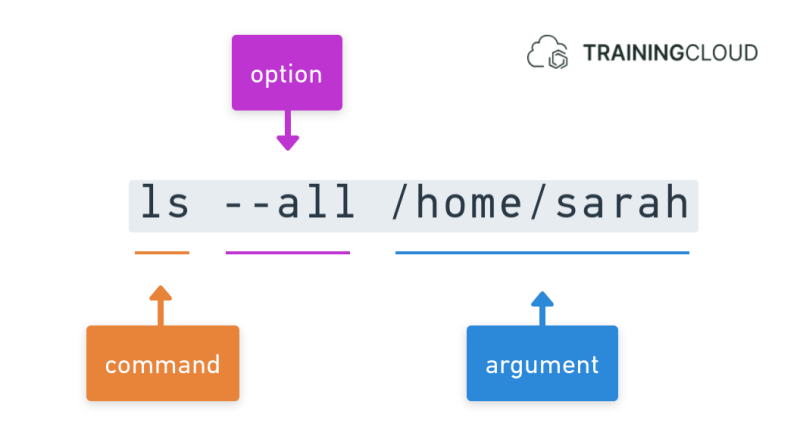
The three parts of a command
Linux commands are made up three parts:
- the command itself
- one or more options
- one or more arguments
By convention, options typically enable or disable certain features, while arguments typically represent a target or object being acted upon.
However, thousands of commands exist, built-in or installable, and they don't always follow the same rules and conventions.
Usually the --help option will tell you how to use the command, and which options and arguments are supported and/or mandatory.
Without options or arguments
Some commands can be used stand-alone - without options or arguments.
Example
On its own, the ls command lists the contents of the current directory:
sarah@laptop: ~$ lsPassing an argument
- Arguments can be optional or mandatory.
- Argument containing space or special characters must be wrapped in single or double quotes.
- Some commands accept only a single argument; some accept multiple arguments.
Example
If you pass the name of a directory as an argument to ls, it will list the contents of that directory:
sarah@laptop: ~$ ls /home/sarahPassing multiple arguments
Some commands accept multiple arguments.
Example
If you pass multiple directories, ls will list the contents of all those directories:
sarah@laptop: ~$ ls /home/sarah /home/hiroshiPassing an option
Options, also called "optional arguments", are by definition optional. They exist in short and long formats.
Example
If you also want to list hidden files, you can use an option to do so. ls supports a short-option and long-option format to tell it to show hidden files:
sarah@laptop: ~$ ls -asarah@laptop: ~$ ls --allBoth options are equivalent.
- Short-options are often used in scripts because they take up less space.
- Long-options are often used when explaining commands, because they are easier to read.
Note that not every option is always available in both a short and a long format.
Passing an option that takes an argument
Some options themselves take (optional) arguments.
Example
The following option tells ls to ignore files with the .pdf extension.:
sarah@laptop: ~$ ls -I "*.pdf"sarah@laptop: ~$ ls --ignore="*.pdf"Conventional notation:
- a short-option and its argument are separated by a space
- a long-option and its argument are separated by an equals sign (=)
We advise that you stick to the conventional notation to avoid confusion and complications when using multiple options in different notations.
For completeness:
Here are a few alternative, less-used notations that are also allowed:
sarah@laptop: ~$ ls -I"*.pdf" (no space between short-option and its argument)
sarah@laptop: ~$ ls -I="*.pdf" (no space between short-option and its argument)
sarah@laptop: ~$ ls --ignore "*.pdf" (space instead of equals sign between long-option and its argument)
Again we strongly suggest you don't use these alternatives formats, but stick to the conventional ones mentioned above.
Passing multiple options
You can pass multiple short-options and/or long-options to a command, with or without arguments, in the order specified by the command's usage instructions.
You can, but don't have to, combine short-options such as -a -b -c into one short-option: -abc.
You cannot do this with long-options.
If you run ls --help, the first thing it tells you is:
Usage: ls [OPTION] ... [FILE] ...In other words:
- You can pass one or more options, and they are optional.
- You can pass one or more arguments, and they are optional.
The fact that options and, in this case arguments, are optional is indicated by the square brackets.
Examples
sarah@laptop: ~$ ls --all --ignore="*.pdf"sarah@laptop: ~$ ls -a --ignore="*.pdf"sarah@laptop: ~$ ls -a -I "*.pdf"sarah@laptop: ~$ ls -al "*.pdf"sarah@laptop: ~$ ls -la "*.pdf"The above are all equivalent.
Passing multiple options and arguments
Bringing it all together, here are a few examples, all of them equivalent:
sarah@laptop: ~$ ls --all --ignore="*.pdf" /home/sarah /home/hiroshisarah@laptop: ~$ ls -all -I "*.pdf" /home/sarah /home/hiroshiAs you can see, you are allowed to mix different notations together, though it doesn't always make it easy to read or understand such instructions. Generally, it's a good idea to stick with either short-options or long-options.
Command-line flags and switches
We've discussed command-line options, but the terms command-line flag, and command-line switch also exist.
- Some people use the term option flag.
- Some people use flag or short flag instead of short-option, and long flag or switch instead of long-option.
- Some people use flag when the value can only be true or false; some use the term switch for exactly that purpose.
- Some people have even other reasons for using one or the other.
We have chosen not to use the terms flag or switch, but instead to stick with the conventions used in the GNU Coding Standards for Command-line Interfaces.
Summary
- Commands can have options, and optional or required arguments.
- The conventional notation for passing options that take arguments:
- Short-options use a space, followed by the argument.
- Long-options use an equals sign, followed by the argument.
- Use the
--helpoption to learn more about a command's usage.