Objectives & prerequisites
- Learn how canonical paths and path aliases relate to each other.
- When and how to use each.
Introduction
This is a short and mostly theoretical unit, but it's quite important. The discussed concepts are fundamental corner stones of how web traffic works in general, and how Drupal deals with it in particular.
URLs and Paths
URL, which stands for Uniform Resource Locator, is one of the key concepts of the Web. It is the mechanism used by browsers to retrieve any published resource on the web.
The path is the part of the URL that points to a specific resource (file, page, ...):
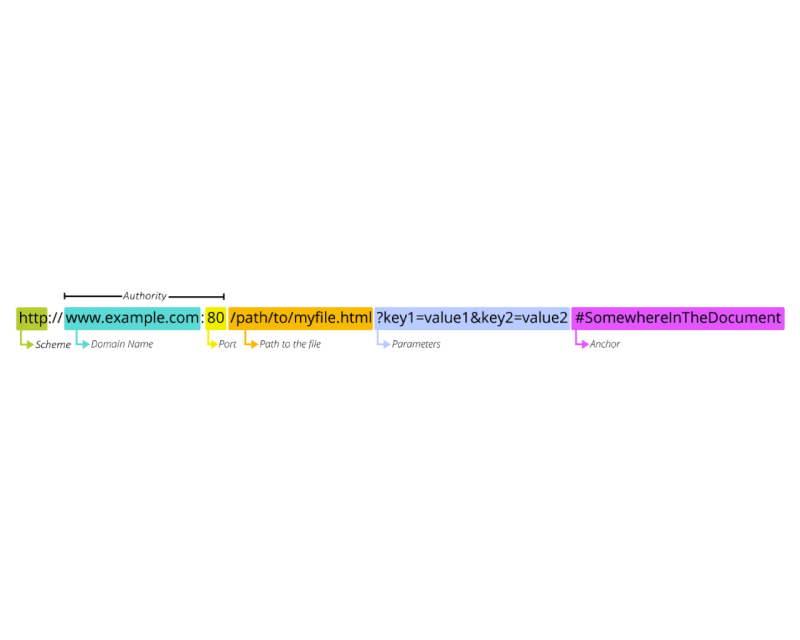
(Definition and graphic by Mozilla Contributors, licensed under CC-BY-SA 2.5)
Important note
On some of Drupal's administration pages you'll encounter fields named 'URL alias', and URL redirect, when the technically more correct terms would have been 'path alias' and 'path redirect' (or just 'redirect').
Just remember that 'path' and 'URL' are not always used consistently in the administration interface, and that most of the time they both refer to the 'path' part of a URL, though that's not technically correct.
Canonical paths
When you create Drupal entities such as users or nodes, they have a default path such as /node/123 or /user/1.
These default paths are also called canonical paths, and cannot be changed. However, when an entity is removed from the system, its canonical path and all of its path aliases (if any) are also removed.
Canonical paths are unique, unchangeable paths that point to one specific resource: one specific page, one specific node, one specific user, one specific term.
Though nodes can have multiple path aliases that may be added/modified/deleted over time, you'll always be able to reach any node via its canonical path.
Many Drupal things have paths, but not all of them have a canonical path.
- Nodes, users and terms have a canonical path
- Views with a Page display have a path, but no unique, unchangeable, canonical path.
Path aliases
Path aliases are alternative paths for a resource, through which that resource is also available. In other words, a node can have multiple path aliases,_ in addition_ to its canonical path.
Example
- You create an article titled 'Hello world', and Drupal sets its ID to 123.
- Canonical path:
/node/123
- Canonical path:
- You edit the article and set the alias to
/articles/hello-world- Canonical path: still
/node/123 - Alias:
/articles/hello-world
- Canonical path: still
What is the practical difference between a canonical path and an alias?
When you browse to a node using its canonical path, that's the address you see in your browser's address bar.
When you browse to a node using one of its path aliases, the alias is what you see in your browser's address bar.
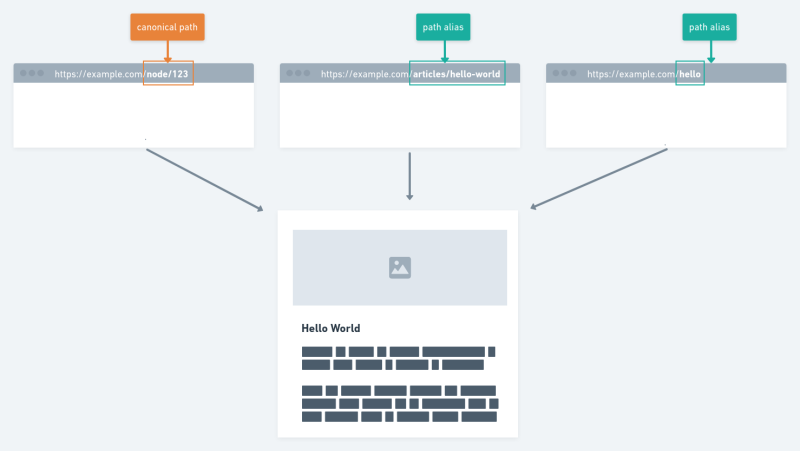
In all cases the exact same node is shown in exactly the same way; the only difference is the URL that is shown in the browser's address bar. It's as is you're browsing to separate but identical pages.
In other words, when you use a path alias, Drupal does not redirect you to the canonical path.This is neither good nor bad... it's just how Drupal works.
Note on SEO
Search engines do not like it when you specify multiple aliases for the same content. They will treat each aliased page as duplicate content and penalise your site's Search Engine Optimisation (SEO) ranking.
If you really need multiple aliases for the same content, refer to the materials on redirects and metatags for different ways you can work around this problem.
Summary
- Canonical paths
- Canonical paths are unique, unchangeable paths that point to one specific resource (one node, one user, …)
- Path aliases
- Create a human-friendly path aliases to use instead of canonical paths.
- Create multiple aliases for the same resource when you want multiple paths to show the same content, while still showing the aliased path in the browser's address bar.
- When creating multiple aliases for the same resource, be aware of potential SEO problems.