Introduction
You can generate multiple alias at once at Admin > Configure > Search and metadata > URL Aliases > Bulk generate:
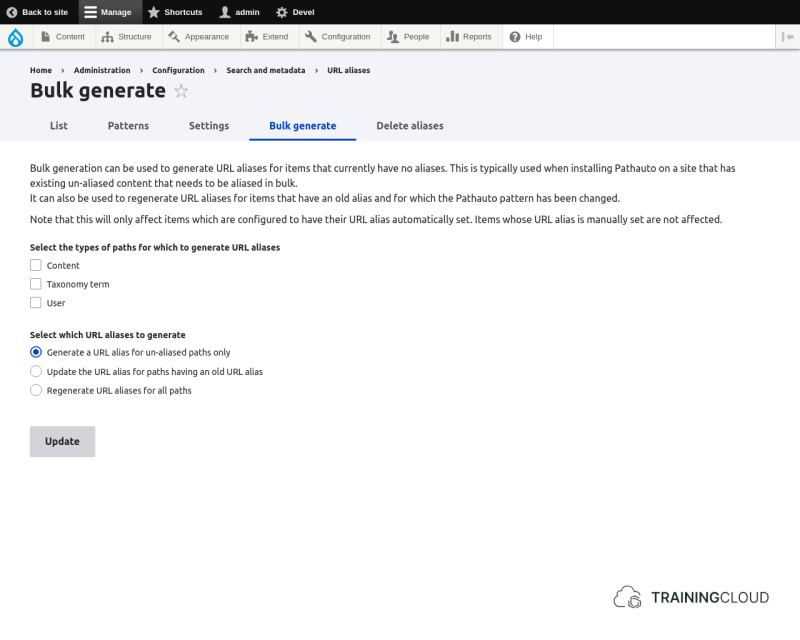
First you need to indicate for which entity type(s) you want to bulk (re)generate the aliases. All the entity types that are configured in the Pathauto settings are available here.
Secondly you need to select which action you want to take exactly:
- Generate a URL alias for un-aliased paths only
- Update the URL alias for paths having an old URL alias
- Regenerate URL aliases for all paths
Overriding automatic aliases
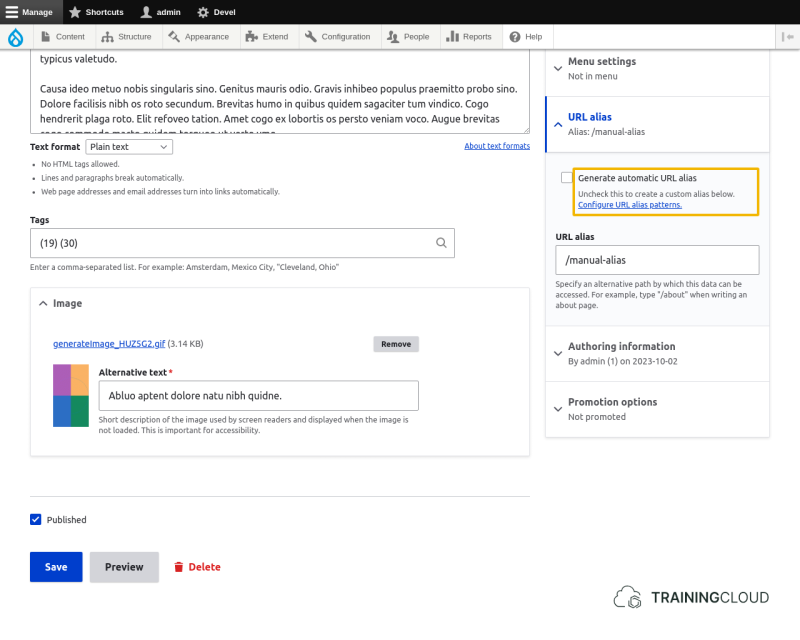
Pathauto will NOT bulk generate paths for entities (nodes, users, ...) that already had their path alias set manually.
If you want to bulk generate paths for entities that had already had their path alias set manually, you need to edit each entity separately and UNSELECT "Generate automatic URL alias" field:
Activity 1
- Ensure you have one article where automatic path aliases are overridden (unselected).
- Modify your Pathauto pattern for Articles.
- Bulk regenerate all aliases
→ Do all articles have an updated alias? Does their previous alias still exist?
→ Check if the article with overridden path alias received a new alias, or if it kept its previous alias. Was this what you expected?
Summary
- You can bulk generate aliases per entity type and specify whether to create aliases for:
- un-aliased entities
- entities with old aliases
- all entities (excluding those who override automatic aliases)
- You can override automatic alias creation for individual entities
- Pathauto will ignore all entities that have their "Generate automatic URL alias" field unchecked.