Introduction
Only the most basic sites are built with just the two default Content Types. Almost every non-casual Drupal site will have one or more custom Content Types.
But creating carefully thought-out Content Types is only the first step.
Use case: Articles
Consider the Article content type, meant for things like news articles, blog posts, and press releases. By default you're expected to use its body field for all of your article content.
But what if:
- You want to start with a single column of text, insert 2 columns of text in the middle, and end with a single column again?
- You want to be able to add embedded images, youtube videos, blocks, forms, collapsible accordion elements, Google maps, or social media posts?
- You want to enforce the dimensions of the articles images.
- You want the author to be able to add a big hero image as the main image
- ...
By default, you can edit the body field's content through the standard Rich Text Editor, and developers can create specific buttons for the editor that let you inject images, videos, quotes, etc, but the end result will still be that all of your multimedia content is stored in that single body field. And that leads to most of the problems mentioned above.
Many sites use the concept of landing pages: each main site section has a mini frontpage with a dashboard or overview, and offers links to navigate deeper into that section's content.
These landing pages often need a flexible design and layout to let section heads or department heads decide how their section's landing page should look.
Ideally, for landing pages you need some kind of mechanism where you can, for each landing page, specify its layout: how many columns, where to place the menu, where to place an email signup form, and so on.
Component-based design
Both these use cases illustrate the need to move away from the standard body field, which is too limiting in several ways, and use something more flexible: component-based design.
The idea behind component-based design is straightforward:
- Site builders make a set of content components available to content editors.
- Content editors can combine all available components to assemble their pages.
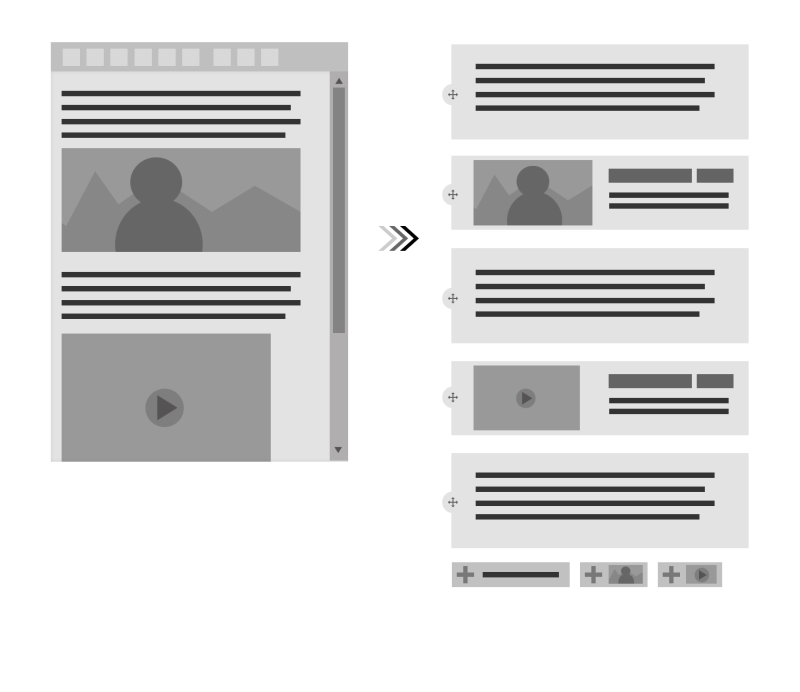
Which components editors can use depend on which components the site builders have made available. And that usually depends on the requirements and wireframe designs delivered by the design team.
Typical content components site builders create include:
- text block
- text + image block
- quote
- 2-column container for other components
- 3-column container for other componentsz`
- call-to-action
- newsletter signup block
- recent news block
- upcoming events block
- Youtube block
- Twitter feed block
- photo grid block
- ...
Here's an example of the components that you could build as a site builder, and make available to your editors for content assembly:
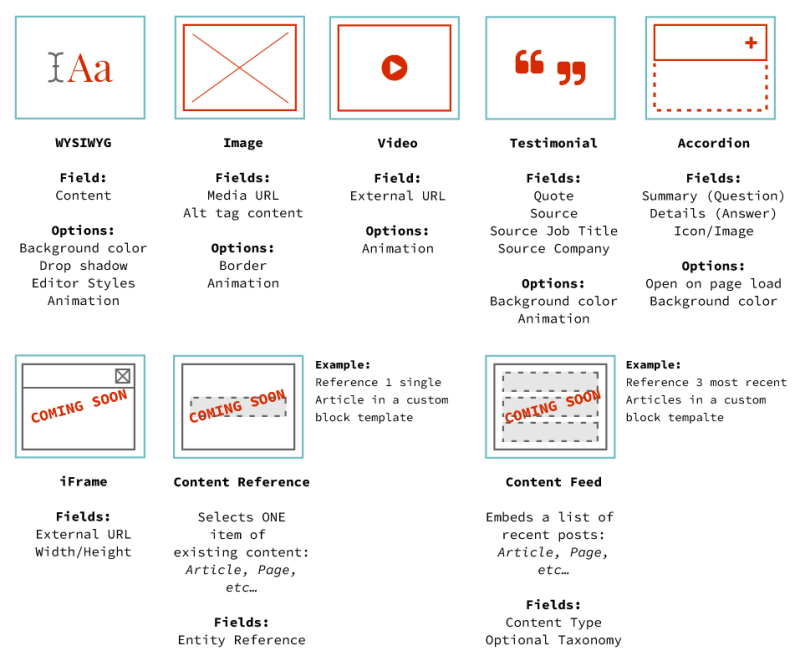
(Source: drupal.org)
Paragraphs vs Layout Builder
Though there are multiple ways of setting up component-based content assembly in Drupal, the two main approaches are Paragraphs and Layout builder.
Both approaches provide a similar workflow, and both use the same layout discovery mechanism, so creating, for instance, column-based layouts provided by a contributed module can be used by both Layout Builder and Paragraphs (more on this later).
The Paragraphs system existed before Layout Builder did, and requires you to install and configure a number of contributed modules.
Layout Builder is younger, but is a part of Drupal Core, which means it's stable and considered by many to be "the preferred choice" simply because it's part of Core.
Both solutions are functionally more or less the same. They both require careful thought and a certain amount of configuration, and they both let you assemble content pages using a sort of WYSIWYG interface.
There are add-on modules that integrate both systems with other aspects of Drupal, or with design systems such as Bootstrap (by Twitter) or Material (by Google).
Ultimately developers make a choice for one or the other based on their exact requirements, familiarity with one approach over the other, and which editorial experience they want to create.
Note:
While it's generally not encouraged to use both systems at the same time, it is possible to combine both systems:
- With the necessary configuration and additional modules, paragraph types, or even paragraphs themselves, can be reused inside pages managed with Layout Builder.
- You can use Paragraphs to manage one type of content, while using Layout Builder for another type of content.
Summary
- Component-based content design refers to replacing the single body field with a mechanism that lets editors assemble content by adding and re-arranging predefined components.
- The two main approaches to component-based content design in Drupal are:
- Layout Builder (part of core)
- Paragraphs (contributed module)
- Layout Builder and Paragraphs are not mutually exclusive, though site builders tend to use either one or the other, to reduce architectural complexity.